


Conversion Confusion Part 1 – Payment Providers in the Referral Channel in Google Analytics
 Magnus Bråth
As a Google Ads specialist, you’re used to conversion rates fluctuating due to a wide range of variables. Seasonality, day of the week, weather, TV schedules—the list of factors that can influence how inclined people are to click the buy button can be made almost endless.
Sometimes, however, what initially appears to be a fairly normal dip in conversion rate develops into a more prolonged decline, despite other indicators such as traffic volume and relevance remaining stable. When that happens, it may be time to troubleshoot whether the drop has a technical rather than a behavioral explanation. In this article series, I will go through a number of tracking-related factors that can affect the conversion rate in the account. These can be used as a checklist when troubleshooting or when setting up a new account.
Payment providers in the referral channel in Analytics
Provided that you use Google Analytics transactions as the conversion definition in Ads, one of the first steps in such troubleshooting should be to take a closer look at the Referral channel in Google Analytics. This is where traffic coming from external websites ends up when no specific tracking is associated with it. A fairly common issue is that traffic is sent to an external payment service domain (for example, cards-eu.klarna.com) during checkout and then returns to the site. In these cases, the transaction risks being attributed to the domain used during payment rather than to the traffic source that originally brought the customer to the site.
You can easily investigate whether you are affected by this by logging into Analytics, clicking Acquisition, Overview, and then Referrals. Then sort by Transactions. If you now see domains associated with payment services listed under Source, and these domains have transactions and revenue attributed to them, you have likely found an explanation for the declining conversion rate in Google Ads.
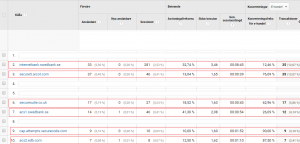
To prevent this from happening, we need to tell Analytics that traffic coming in via these domains should not be categorized under Referrals, but instead be attributed to the source prior to the referral. This is done by going to Admin (click the gear icon in the lower left corner) and, under Property, clicking Tracking Info and then Referral Exclusion List. Next, click the button ADD REFERRAL EXCLUSION, enter the domain you want to exclude, and click Create to save. Done!
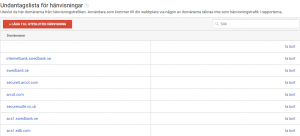
After making the exclusion, it’s a good idea to monitor the referral channel for a period of time to ensure that the number of transactions attributed to payment service domains actually decreases. However, be aware that this measure does not solve the problem retroactively; it only affects new users. There may therefore be lingering transactions from returning users who enter via the Direct channel and whose last non-direct traffic source was a referral from a now-excluded payment service domain.
More information about referral exclusions can be found here: https://support.google.com/analytics/answer/2795830?hl=sv


