


Optimize your videos with Google’s latest feature – key moments in videos
 Caroline Danielsson
Considering that around 5 billion videos are watched on YouTube every day, it goes without saying that video content should be optimized just as carefully as websites and written content. Search engine optimizing videos is a newer discipline compared to traditional text-based search, which means that exciting new features appear from time to time. One of the latest developments in video optimization is the ability to jump to key segments within a video directly from the search results.
So far, this feature is limited to English-language videos on YouTube. Since Google owns YouTube, this is not entirely surprising, but Google has stated that it plans to expand the feature to more languages and platforms in the near future. If you are active in international markets and want to reach a wider audience with your videos, this is a feature worth learning about.
What are key moments in videos?
This feature is designed to make it easier both for users who search on Google and for Google itself to surface relevant video results. By allowing video creators to mark key moments in their videos, describe what they are about, and specify when they occur, you can potentially rank for a much broader range of keywords in organic search results.
For example, imagine you have a video about different horse breeds. By telling Google that you talk about Arabian horses at 0:30 in the video, Andalusians at 1:05, Fjord horses at 3:54, and so on, it becomes easier both to gain visibility and for Google to understand the content of your video.
Key moments in videos
This video feature was launched in early September and is still in an experimental phase. It allows you to mark so-called key moments in your videos and give them descriptive names. When someone searches on Google for, for example, the horse breed “Andalusian,” the search engine can identify that your video covers this topic at 1:05 and display it as a result in organic search.
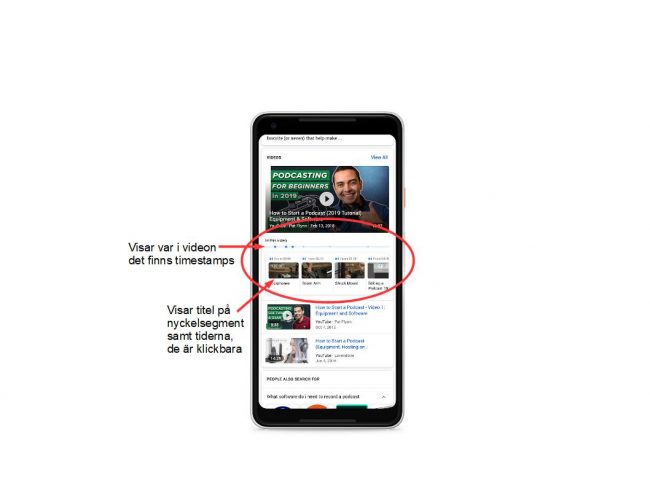
The video is then shown together with timestamps, which make it possible for the viewer to jump directly to the point in the video where you start talking about Andalusians.
These key moments and timestamps are not created automatically by Google. You need to provide the search engine with this information and the exact timings. This requires some manual work, where you enter the data using Google’s Clip structured data. The video must also have VideoObject structured data in place in order for you to define key moments. Once that is done, you can create timestamps as part of the video’s structured data.
Timestamps
Timestamps are specific points in a video that users can jump to. This functionality has existed on YouTube for some time, although in a more limited form. You can see this yourself if you click “Embed” when sharing a YouTube video. There, you can specify a start time for the video.
However, this only allows you to set a single later start time. There is no way to define multiple timestamps, and this information is not something Google can use for search features.
When using timestamps to create key moments, the process is different. First, you need to use structured data and specify which times should act as timestamps, along with what each timestamp represents.
The image below shows a Google search result where a video about podcasts is suggested. The user can see which timestamps the video owner has created and can jump between different segments depending on what they are interested in.
What requirements must your videos meet?
Since this feature is still very new, you currently need to register your interest to gain access. You can do this via a Google form, which you can find here. Google does not guarantee that everyone who registers interest will be granted access.
For your key moments to be registered correctly, and for your application to have a chance of being approved, your videos must meet certain requirements:
- The video must be publicly accessible and not hosted on a site that requires login.
- The video must be viewable without requiring a subscription or similar restrictions.
- The video must be longer than 30 seconds.
- Clip structured data must be used on the page where the video is available.
- No two segments in the same video may share the same start time on the same page.
- The video must include VideoObject structured data.


