



In Google Search Console, you can find suggestions in the HTML Improvements section. Here we explain what is meant by duplicate meta descriptions and provide tips on how to resolve the issues.
When a meta description is duplicated, it means that identical meta description tags are used on two or more pages on your site. This is not recommended. A better solution is to ensure that each page you want indexed by Google has a proper meta description that describes what the page is about. The text should also encourage clicks, as this is the text potential visitors see in Google’s search results below the title. Below is an example of what a typical meta description tag can look like in the source code.

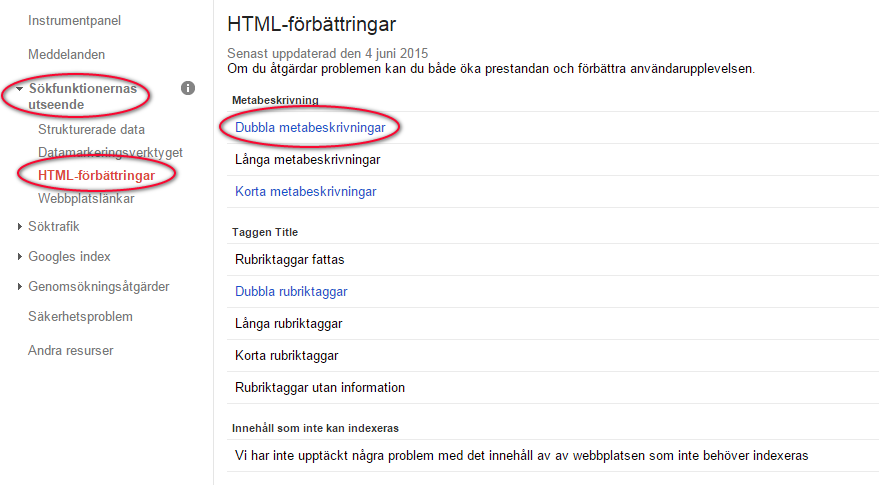
To view duplicate tags in Google Search Console, you must first have created an account. If you have not already done so, you can create one here: https://www.google.com/webmasters. Inside the tool, navigate to Search Appearance / HTML Improvements / Duplicate meta descriptions.
There you will see a list of pages that Google has identified as having duplicate meta descriptions.
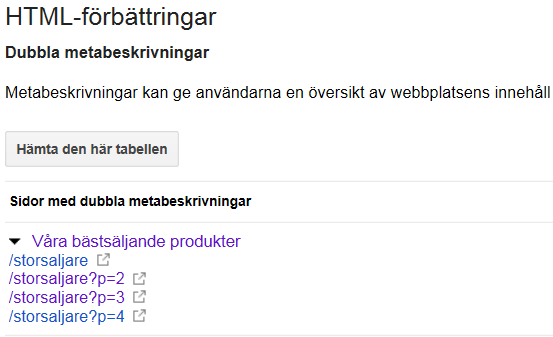
Then follow the links, go to your site, and change the meta descriptions for the listed pages. In some cases, such as in the image above, Google may also display dynamic pages in this list. It is therefore important to decide from the start to only change meta descriptions on pages you actually want indexed by Google. To determine which pages you want Google to index, we strongly recommend reading our post about duplicate content, which covers the topic in more detail.
Other ways to access the information
It is also possible to retrieve this information in other ways, for example by using your own crawler or one of the many crawling tools available, such as Screaming Frog. If you have a site with very few pages, the easiest approach is to do it manually by checking the source code or taking a look in the publishing tool.


